,,,,,,,,,,,,,,,,,,,,,,,,,,,,,,,,
Feb2026
Florida Live Scan Level 2 Live Scan Appointment Checklist: Everything You Need to Bring

Level 2 Live Scan Appointment Checklist: Everything You Need to Bring

On your way? Listen to the packing list!
Level 2 Appointment Essentials ⏱ 1:47 mins

There is nothing more frustrating than arriving at your background check appointment only to be told you have the wrong ID or an incomplete form.

A Level 2 Live Scan is a state- and federal-level criminal history check that requires high-level security verification.

Because this data is transmitted directly to agencies such as the DOJ or the FBI, the technician must follow strict protocols. Being prepared isn’t just a suggestion—it’s a requirement for the system to accept your prints.

Use this comprehensive checklist to ensure your appointment goes smoothly and your results are processed without delay.

⚖️
Certified Provider DOJ & FBI Approved
🔒
Data Privacy 256-bit Encryption
🗺️
Accessibility 1,200+ U.S. Locations
🚀
Efficiency Instant Digital Transmit
⚡ Key Takeaways
1. Bring your printed Request Form with a valid ORI number.
2. Have your physical (not digital) government photo ID ready.
3. Be prepared for a cashless payment or have a billing code.
4. Double-check your name spelling on all docs.

1. The “Request for Live Scan Service” Form

This is the most critical document. Without it, the technician literally does not know where to send your results.

1
Agency Copy

You must bring the physical, official form provided by your employer or licensing board. Digital images or links are often unreadable by the scanner software.

2
Pre-Filled Info

The "Agency Information" section must be filled out by the organization requesting the check. If this is blank, the results have nowhere to go.

3
ORI Number

Verify the Originating Agency Identifier (ORI) is present. This 9-digit code is the "address" that routes your biometrics to the right department.

💡
Check for the Code: Most ORI numbers begin with a character followed by numbers (e.g., A1234). Technicians cannot legally "guess" this number for you.

2. Valid Government-Issued Photo ID

The technician is legally required to verify your identity against the data on your form. The name on your ID must match the name on your request form exactly.

Accepted Primary Identification

ID TypeRequirements
Driver’s LicenseMust be current (not expired) and issued by a U.S. State.
U.S. PassportMust be valid.
State ID CardMust be government-issued with a clear photo.
Military IDValid U.S. Military identification.
⚠️ What if my ID is expired?

If your Primary ID is expired or missing, you must provide two of the following secondary documents along with a Birth Certificate or Social Security Card:

  • State/Local Govt ID
  • U.S. Student ID (with photo)
  • Voter Registration Card
  • U.S. Military Dependent's ID
  • Merchant Marine ID
  • Native American Tribal Doc
  • Canadian Driver's License
  • Utility Bill (Matching Name)
*All documents must be originals. Photostatic copies or digital images on smartphones are NOT accepted by Live Scan technicians.

3. Payment Confirmation or Method

Unless your employer has provided you with a Billing Number (meaning they are paying for the service directly), you will be responsible for the rolling fee and the state/federal processing fees.

  • Credit/Debit Cards:
    Most Certifix locations are cashless for security.
  • Billing Numbers:
    If your agency is paying, ensure the billing number is written clearly on your form.

4. Specific Agency Requirements (Level 2)

Level 2 checks often involve specialized agencies (such as AHCA in Florida or the DOJ in California). Depending on your role, you may also need:

  • Social Security Number:
    While not always in the form, you should know it for verification.
  • Registration ID:
    Some healthcare or education portals provide a specific registration number after you pay their internal fees.

Ready for your scan? Tick off these items as you pack your bag to ensure 100% success.

Your Packing List
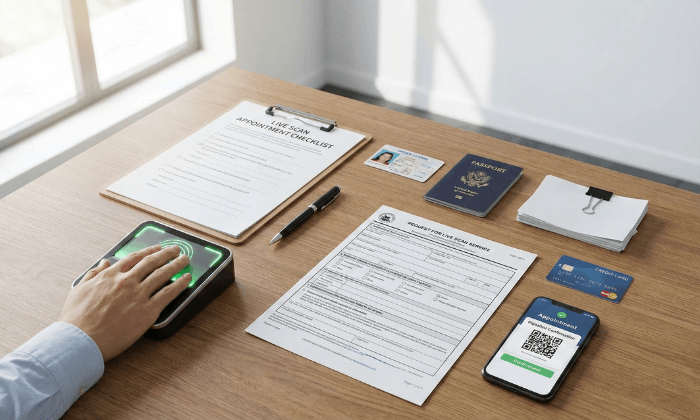
Request for Live Scan Service Form (Printed)
Valid, Unexpired Government Photo ID
ORI Number (Pre-filled on form)
Payment Method (Card or Billing Number)
Appointment Confirmation (Email/SMS)

🚪 Don't Leave Without These

Tap each item to confirm you're ready to head to the center.

📄
Printed & Readable Form
🪪
Valid ID in Wallet
💳
Payment Ready
☀️

Ready to Complete Your Florida Background Check?

Enroll today and visit a nearby location to submit your fingerprints for FDLE or AHCA processing.

Get Started with FDLE/AHCA →
FDLE Approved
AHCA Compliant
Fast Results

Enjoy this article? Don't forget to share.


Get Live Scan Fingerprinting Near You

Live Scan & Fingerprint Card Services
Start by Enrolling Online.
You’ll receive a token for California services or a QR code for nationwide services. After enrolling, select a convenient location to complete your fingerprints.

Leave a Reply

Your email address will not be published. Required fields are marked *